Showing posts with label Blowfish. Show all posts

Monday, April 1, 2013

Google celebrates April fool's day


google-maps-treasure-map
Google Celebrates April Fool’s day with some amazing features such as ‘Treasure Layer’ in Google Maps and a video suggesting YouTube will close tomorrow.
First up, as you can see in the photo above, a Google Maps look at San Francisco has a much different look that hearkens to old pirate tales. To see the Treasure Map layer, go into Google Maps and tap the Treasure option in the top right corner.
Google also released a three-and-a-half-minute April Fools’ video from the YouTube team (watch it below) saying that YouTube will close tomorrow and has actually been a massive contest to find the best video in the world. The company says it will review every video that has ever been uploaded and will delete everything else but the winner.
The search giant has also pushed out another practical joke called Google Nose, a program that lets you search by scent. This year Google’s flagship fake product is Google Nose. Nose purports to let you search for scents in Google search and use Android devices to smell objects and tell you what they are. Google says Nose can help you identify the smell of “a new car”, “the inside of an Egyptian tomb,” or “a ghost.”
google-nose-prank


“Our task as designers is to get our users the information they are looking for as quickly and beautifully as possible,” a Google user experience designer says in the video. “But until now we couldn’t give users what they are looking for — because sometimes they’re not looking at all.”

Blowfish12@2013 blowfish12.tk Author: Sudharsun. P. R.

Wish to have Android apps On Windows or Mac

“Android is not just for Android devices any more. Thanks to the BlueStacks App Player, you can run your favorite Android apps on PCs running Windows XP, Vista or 7. You can run them on a PC or even a tablet running Windows 8. If you've got a Mac, BlueStacks will let you run Android apps on it as well. This nifty player won Best of CES last year -- and it's free.”
Have you got some favorite smartphone apps? Not convinced by Microsoft's new Windows app selection? Itching to see some Android action on your MacBook Pro? Don't worry, just install an Android emulator on your Windows or Mac machine and run all of the Android apps that you've grown to love.
A version is even available for Windows 8 Surface tablets. Load up to 750,000 Android apps, including games, SMS text messaging, and media apps.
The free product that lets you do this is BlueStacks App Player, and it claims more than 5 million downloads.
Here's how to go about loading and running the BlueStacks emulator:
Installation and Use
Step 1: Browse to the BlueStacks Web page on a desktop computer or laptop and click on the download button for your operating system. Choose between XP, Vista and Windows 7; Windows 8; or Mac.
Follow the usual steps for installing software, opening the .exe file. Follow the prompts to allow installation and then accept the terms of the license agreement by clicking on the Welcome to BlueStacks' Continue button.
Step 2: Verify that App Store Access and App Notification check boxes are enabled on the following screen and then click Install. Allow the BlueStacks application to load.
Step 3: Click on the My Apps tile and then on the App Search button.
Search for an app that you use regularly on your smartphone or tablet. For example, I searched for Falcon Pro, a robust, paid-for Twitter client I like. Allow the in-Bluestacks search to complete and then click on the Install button adjacent to the search result.

Tip: The app doesn't install from this search. This search just tells you which store has the app you want.
Step 4: Choose an app store from the selection. I chose the Google native Play store, but there will be others listed, including Amazon.
Tip: Choose the store that you normally use on your device. It will be cheaper to migrate an app that you've already paid for.
Step 5: Add your account details if prompted. If you already have a Google account, add it here. Allow any sync to take place and then select Finish Setup. Click on any terms and conditions check boxes and then press Continue.
Step 6: Perform a second search for the app that you want to install. Allow the search to take place and then choose Accept and Download. Allow the app to install and then open the app. This search is from within the store that you may be familiar with, like Play.
Tip: Use the on-screen keyboard that pops up rather than the PC's physical keyboard if you run into keyboard mapping issues when communicating with the app.

Blowfish12@2013 Blowfish12.tk Author: Sudharsun. P. R.

Related articles

Sunday, March 31, 2013

Planning to buy a cell Phone? why not Build it!

David Mellis is a graduate student in the High-Low Tech lab, a group of engineering has built a custom cell phone himself. In 2005, he helped found Arduino, a company that makes easy-to-program microprocessors and sells them on simple circuit boards. The idea is to help people make electronic products without needing a degree in computer science.


custombuiltcellphone


They're popular among hobbyists, hackers and the sort of people who end up working at the Media Lab but they're hardly mainstream. Mellis wondered if he could take the idea further  and build a cell phone. "The tricky thing is getting it beyond the people who are already doing electronics stuff," he says. So he decided to see if he could design consumer electronics that you can make yourself and actually use. He started with radios, speakers and computer mice before making the leap to the ultimate consumer device: cell phone.


I'm nervous at first – I've never soldered anything in my life. That makes me a good test subject, Mellis says. "I'm interested in trying to open up the process to people who haven't really done this stuff before," he says.


Soldering felt a little like doing a colour-by-numbers painting – I was filling in spaces on the circuit board, but my understanding of how the parts fit together was pretty sparse. And a lot of components were still out of my control. I used Mellis's software, for instance, which gives the phone capabilities similar to that of a 10-year-old Nokia phone: it can make and receive calls and texts, store up to 255 phone numbers, and has a clock.


The whole thing costs about $100 in parts, excluding the SIM card. Nearly all of the components came from online electronics or hobbyist shops, he says, and the instructions and source code are available on his website. However, the GSM module, which connects the phone to the cellular network and translates audio signals to the speaker and microphone, came from a Chinese e-commerce website.


The back of the phone has spaces for working parts: the GSM module; a microcontroller, which brings signals from the GSM module to the buttons and screen; a matchstick-sized antenna; and a SIM card holder. I bought the SIM card, with its month-to-month data-free plan, from the T Mobile store – connecting to the network is one thing I can't do myself.


When it was time to laser cut the case, I used Mellis's designs. That means my phone is identical to his prototype, which he has been using as his mobile phone for the past three months. The end result is a little coarse and chunky, but ends up about the size and thickness of my Android smartphone. I'm already thinking of ways to make it my own. I could knit it a case. I could paint it. I could design a new cover and have it laser cut myself.


I'm also thinking of ways I could use it. One of Mellis's labmates wants to make a phone with a single button for his grandma to call him. Another says that if she ever has kids, she'll give them a phone that only calls her.


I'm not ready to throw away my smartphone just yet. But I might start taking this phone on holiday, so I can escape Facebook and email but still make calls. And because I built it, I'm starting to grow quite attached to it.


Blowfish12@2013 blowfish12.tk Author: Sudharsun. P. R.

Monday, February 18, 2013

Facebook hacked, Java disabled

Facebook has been hacked and has disabled Java environment.


Facebook announced that it was hacked in its blog post after some of its employees visited an infected mobile developer website in January. It assures that user data hasn’t been compramised after its security breach.


“They gained limited visibility into our systems,” Fred Wolens, a spokesperson for Facebook, told in an interview, “We’ve accelerated our program to disable Java in our environment.”


“The company explained in the blog post that the laptops that were infected were “fully patched” and ran the most up-to-date antivirus software prior to the infection. It is currently working with law enforcement to dig into the hack’s details. The malware came through another issue with Java, the programming language that Oracle recently patched to fix a number of other issues. The Department of Homeland Security even recommended that people uninstall Java since hackers were finding new holes often.”


“After analyzing the compromised website where the attack originated, we found it was using a ‘zero-day,’ previously unseen exploit to bypass the Java sandbox (built-in protections) to install the malware,” said Facebook in the blog post. “We immediately reported the exploit to Oracle, and they confirmed our findings and provided a patch on February 1, 2013, that addresses this vulnerability.”


Facebook has not specified who the attackers are, and it very well may not know. The company does, however, say that it was “not alone in this attack” and that it wanted to tell the world about this hack quickly so that others can start their own remediation.


Blowfish12@2013 blowfish12.tk Author: Sudharsun. P. R.

Ubuntu Phone OS Preview releasing on Feb. 21

Developers (and plenty of brave geeks) will soon be able to get a taste of Ubuntu’s smartphone version on their Galaxy Nexus or Nexus 4.


Ubuntu developer Canonical announced today that it will release a Developer Preview image, along with the necessary tools to install it, for the two Nexus devices on Feb. 21.


“Canonical says the image will be of the latest developmental milestone for the touch-based Ubuntu (which really needs a catchier name). Developers will be able to build apps using the developer preview, as well as port them to Ubuntu on other devices.”


“Our platform supports a wide range of screen sizes and resolutions,” said Canonical’s Pat McGowan, who’s heading up the release of the touch-based Ubuntu image, in a statement today. “Developers who have experience bringing up phone environments will find it relatively easy to port Ubuntu to current handsets.”


Check back next week for our full impressions of Ubuntu on the Nexus 4.


Blowfish12@2013 blowfish12.tk Author: Sudharsun. P. R. Courtesy: Canonical


Thursday, February 14, 2013

Yet another movie like ‘The social network’

Fox released the trailer for its comedy The Internship Movie following two “salesmen whose careers have been topped by the digital world. Played by Vince Vaughn and Owen Wilson, the two set off to Silicon Valley to prove that they are still relevant by landing internships at Google.


It goes to show how mainstream Silicon Valley is becoming. It started with The Social Network, which took brought Mark Zuckerberg’s creation of Facebook straight into the heart of Hollywood. Now, we’ve got a focus on Google and its famed working culture of slides, great food, nap rooms, and more.

The trailer shows scenes from Google’s “campus,” including a clear dry-erase wall (that Vaughn writes on with Sharpie), a self-driving car, a Rubik’s cube competition, and a bunch of smart twentysomethings who have it out for the two “old guys.”

It’s a tale of old-timey institutions being overrun by the newer, younger, digital revolution. At one point, those crazy Google youngsters send Vaughn and Wilson off on an adventure to find “Charles Xavier,” a Stanford professor who is balding and in a wheelchair. It doesn’t end well for the pair.


Blowfish13@2013 blowfish12.tk Author: Sudharsun. P. R.

Repairing Surface Pro is gonna be a headache, iFixit

Microsoft”s new Surface Pro tablet PC is a version upgrade with drastic enhancements of its Surface RT, but it is gonna be extremely hard to repair, ifixit.


The repair pros at ifixit had the Surface Pro opened and examined. The Pros found that is it was impractical or impossible to repair the device, and provided a “1 out of 10 reparability score”.


“One huge problem iFixit found is if you do not open the case perfectly, you will almost certainly break one of the four cables surrounding the display. So there’s a good chance you’ll break the damn thing just from trying to peek inside or trying to fix a minor issue.”

“Report Said

  • The battery is not soldered to the motherboard, so at least no soldering is required to replace it.

  • The SSD is removable .

  • More than 90 screws are inside this device.

  • The display assembly (comprising of a fused glass and LCD) is extremely difficult to remove/replace.

  • Tons of adhesive hold everything in place, including the display and battery.

  • Unless you perform the opening procedure 100 precent correctly, chances are you’ll shear one of the four cables surrounding the display perimeter.”


Blowfish13@2013 blowfish12.tk Author: Sudharsun. P. R.

MyTalk network security breached

“Jambox wireless speaker creator Jawbone is singing the blues today. It alerted users early this morning to a hack on its MyTalk network that left names, email addresses, and encrypted passwords compromised.”


The MyTalk network is platform where they can update, find and download apps for Jawbone devices. A customer has voluntarily reported he has received this message on twitter. It reads “Based on our investigation to date, we do not believe there has been any unauthorized use of login information or unauthorized access to information in your account.”


Jawbone says that “because your password was taken was encrypted and none of “the actual letters and numbers in your password” were revealed, hackers have ways to decrypt information”.


Blowfish13@2013 blowfish12.tk Author: Sudharsun. P. R.


Tuesday, February 12, 2013

Top Techies and their names

Do you wish to know how top technology game players got their names. Here are few interesting ones.


Apple

“According to Steve Jobs , He named Apple so because, he was coming out of an apple farm and thought that the name was “fun, spirited and not intimidating”.

HotMail

HotMail founder Jack Smith wanted to access email via internet and wanted to name it ‘ending with mail’.

“Jack smith got the idea naming his firm as HotMail, from HTML as the name included all the letters of the word”.

Twitter

After their name idea ‘Twitch’ got rejected, co-founder Jack Dorsey says “they skimmed across the dictionary and came across the word twitter and it was just perfect.The definition was 'a short burst of inconsequential”.

Accenture

From "Accent on the future". The name Accenture was proposed by a company employee in Norway as part of an internal name finding process”

Its former name was Andersen Consulting.

Google

Google got its name so, its because co-founders misspelled the word Googol.

Acer

Acer translated its tag line into Latin meaning “Sharp, Acute, Able and Facile”.

Skype

The concept of Skype is Sky-Peer-to-Peer which was morphed to Skyper, later to Skype

Amazon.com

Founder Jeff Bezos renamed the company Amazon (from the earlier name of Cadabra.com) after the world's most voluminous river, the Amazon.

Infosys

Abbreviation of ‘Information Systems’.

Cisco

Abbreviation of ‘San Francisco’.

Epson

Named by Morphing the tag line “Son of Electronic Printer”.

Compaq

Named from the words ‘pack’, ‘Compatibility And Quality’

HTC Corporation

A abbreviation of its original corporate name, High Tech Computer Corporation.

Oracle

Larry Ellison, Ed Oates and Bob Miner were working on a project named Oracle.

Nero

Nero – Nero Burning ROM named after Nero burning Rome ("Rom" is the German spelling of "Rome")


Blowfish12@2013 blowfish12.tk Author: Sudharsun. P. R.

Tuesday, February 5, 2013

Windosify android

Windows apps on Android Wine makes it happen”

Twenty years later Wine is making an new leap on Android platform. The software makes it possible for us to run Windows software on Linux and other Linux Platforms.

While Microsoft making its new leap on metro design UI, Wine is planning it port to Android enabling us to port windows applications on Android, reports Phoronix.

wineandroid


Blowfish12@2013 blowfish12.tk Author: Sudharsun. P. R. Photo Courtesy: phoronix

Sunday, February 3, 2013

Top 5 best selling phones in the U. S.


RankBrand
1iPhone 5
2Samsung Galaxy S III
3iPhone 4
4iPhone 4S
5Samsung Galaxy S II

The iPhone 5 was the top-selling smartphone in the last quarter of 2012, according to that NPD Group report.


Blowfish12@2013 blowfish13.tk Author: Sudharsun. P. R. Source: npd.com

Program in Arabic

We all think that programming languages are not easily understandable, but if we take a closer look we find that it has lot in common with English.


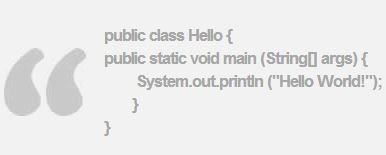
For Example here is a piece of java code

c1
“Even if you don’t understand it fully, you’ll certainly recognise most of them.”

A research has found that learning programming languages is difficult for non-English speakers, and feel that it might have been easier if it had been in their mother tongue. Ramsey Nasser, a software engineer and designer at the Eyebeam Art and Technology Center in New York, has also felt so.

Nasser has created قلب (pronounced "alb," meaning "heart"), a programming language based on Arabic script, which he hopes will attract new programmers from the Arab world. The base of alb is based on an existing programming language called Scheme.

Alb is not the first Arabic language - that was Arablan in 1995 - and similar projects have been set up in China.


Blowfish12@2013 blowfish13.k Author: Sudharsun. P. R.

Wednesday, January 30, 2013

Microsoft Office 15 launched

Microsoft has finally released several consumer-focused versions of Office 365 and Office 2013 to 162 markets.


After Windows, Office is arguably Microsoft’s most important product and helps the company make a lot of cash. Office programs such as Word, Excel, PowerPoint, and Outlook are staples around the world for productivity, and while compelling alternatives do exist, these apps are still the standard for how we get work done.


But times have changed since Office debuted in 1990, and Microsoft is trying to adapt to how we work now. We’re much more mobile, we have more devices, and we’re more likely to subscribe to software at a reasonable price than pay a ton upfront. (Adobe has noticed these trends too.)


So Microsoft is offering different plans for the newest version of Office and trying to coax consumers and students with a relatively decent subscription deal. Or you can get into Office “the old way” and buy a single copy for a single PC.


Here are the details on how Microsoft is now offering up Office 365 and Office 2013.


Office 365

Office 365 Home Premium — $99/year — 5 devices


Programs: Word, Excel, PowerPoint, OneNote, Outlook, Publisher, Access


Microsoft is prioritizing Office 365 Home Premium as its top offering for consumers. With it, you can install a copy of the software on five different devices, including PCs and Macs. The software ties itself to one Microsoft account and lets you use that account to manage it in the cloud.


Office 365 Home Premium is cloud-connected in several ways. For example, when you save a document in Word or Excel, it saves simultaneously to SkyDrive and to the computer’s hard drive. That way, no matter where you access a document, you have the latest version of it. Office 365 subscribers also get 60 free Skype minutes per month and get a boost in SkyDrive storage from 7GB to 20GB.


Additionally, subscribing to Office 365 gets you an ingenious feature — Office on Demand. Essentially, whenever you are on a Windows 7 or 8 PC that is not one of your five installs (let’s say you’re at a friend’s house or a satellite office), you will still have access to Office. Microsoft actually streams a copy of Office from the cloud down to that computer and you can save your work to the cloud. When you are finished with your Office on Demand session, the copy disappears and removes all traces you were there. (We wish this worked on Macs too, but hey, can’t win ‘em all.)


“We want to drive the most demand for this,” Jevon Fark, senior marketing manager at Microsoft told. “This is easily the most ambitious version we’ve ever offered in the 25-year history of Office.”


Office 365 University — $80 for 4 years — 2 devices


Programs: Word, Excel, PowerPoint, OneNote, Outlook, Publisher, Access


The company will also offer a version of Office 365 aimed squarely at college students. It is basically the same offering as Office 365 Home Premium, but it comes at a better overall price and only lets you install the software twice. You’ll also get the convenience of Office on Demand, which could come seriously in handy in university computer labs, which may not have the latest version of Office installed.


Frankly, Office 365 University looks like a killer deal. Microsoft says it will let students re-up on the $80-for-four-years offer a single time, which helps if they need extra time to get their Bachelor’s degree or go to grad school.


Office 2013

If you’d rather pay a large amount upfront and not have to subscribe to get your software, Microsoft also is offering Office 2013 Home Premium in three other versions. Think of these versions as a more traditional approach to Office. If you just want a single copy that can only be installed on one PC, this is your software.


Keep in mind, Office 2013 is not as cloud-connected as Office 365. You don’t get Office on Demand and your documents don’t save simultaneously to SkyDrive and your hard drive. You can, however, save your documents just to SkyDrive if you want.


Office 2013 Home & Student — $140


Programs: Word, Excel, PowerPoint, OneNote


Office 2013 Home & Student will be the overall least expensive offering in the new Office family because you get the most basic Office programs and simply pay $140 for the life of the product. It offers the bare bones package though.


Office 2013 Home & Business — $220


Programs: Word, Excel, PowerPoint, OneNote, Outlook


Small businesses that want to approach Office from a more traditional perspective of buying a licence or two for those who need a new copy might want this version. Office 2013 Home & Business is targeted at smaller companies rather than medium-sized companies and enterprises.


Office 2013 Pro — $400


Programs: Word, Excel, PowerPoint, Outlook, OneNote, Publisher, Access


If you’re a serious Office aficionado and need the full suite of Microsoft tools, Pro is your version. Unless, of course, you’d rather have the same programs and get extra goodies by subscribing to Office 365. Chew on this: Pro costs $400 and only lets you install on one device, while 365 Home Premium lets you install on five devices with more cloud features. If you use Office 2013 Pro for four years, only then do you make up your investment when you could have paid the same for four years of Office 365.


Interestingly enough, Microsoft isn’t shy to admit that paying $400 for Pro isn’t a good deal. “My understanding is that we don’t want people to buy Pro for $400 — we want people to subscribe to 365,” Fark told us.


How it runs

The final copy of Office 365 Home Premium runs quite similar to what we saw previously when testing Office 2013. This is the Office you’ve known (and maybe liked) for years, but it has a more compelling design and more features. One feature that really stuck out was PowerPoint’s new Presenter View, which lets you preview slides and other info on your PC’s screen while giving a presentation. (You can partially see Presenter View in the top photo.) Another feature is a new start screen that pops up when you start Word, Excel, PowerPoint, and more that shows popular template options.


What makes the latest version of Office a bit different besides the cloud-connected features is that it’s also built with touch in mind. Microsoft wants you to use this software on its Windows 8 tablets like Surface as well as Windows 7 and 8 PCs. You can change the settings that optimize icons and options for touch. But exclusively using touch can be a recipe for frustration — I found it challenging to input lots of numbers or prepare a presentation. I’d much rather use these programs with a mouse and keyboard.


More business support coming

Next up, Microsoft will launch the latest version of Office 365 for businesses on Feb. 27. The company hasn’t divulged details on how it will differ from Office 365 Home Premium yet, but we suspect it will offer various group editing and collaboration features in the cloud. When we find out, we’ll let you know.


Blowfish12@2013 blowfish13.tk Author: Sudharsun. P. R


Saturday, January 26, 2013

Facebook: Data block for Replication

After cutting off data access for Wonder, a social search app from Russian search engine Yandex, Facebook explained today that if you’re building an app that “replicates” its “core functionality,” its data is not for granted


“For … apps that are using Facebook to either replicate our functionality or bootstrap their growth in a way that creates little value for people on Facebook, such as not providing users an easy way to share back to Facebook, we’ve had policies against this that we are further clarifying today,” wrote Justin Osofsky, Facebook’s director of platform partnerships and operations, in a blog post.

The company’s new Platform Policy section 1.10 now reads:
“Reciprocity and Replicating core functionality: (a) Reciprocity: Facebook Platform enables developers to build personalized, social experiences via the Graph API and related APIs. If you use any Facebook APIs to build personalized or social experiences, you must also enable people to easily share their experiences back with people on Facebook. (b) Replicating core functionality: You may not use Facebook Platform to promote, or to export user data to, a product or service that replicates a core Facebook product or service without our permission.”


Blowfish12@2013 blowfish12.tk Author: Sudharsun. P. R.  Courtesy:  developers.facebook.com

Get your copy of Windows 8 before it is too late

While it’s easy to hate on Windows 8, it’s time to stop muttering about the changes and buy the upgrade before it gets way more expensive.


Windows 8 has sold more than 60 million licences to date, but Microsoft has not revealed how many of these copies have been activated. Still, these are generally good numbers, and it is keeping pace with initial Windows 7 sales. Microsoft has invested a lot of time and money into Windows 8 and will continue to update the software to make it run better.


1. The base price of Windows 8 will jump 300 percent on Feb. 1


As noted in the intro, the cost of Windows 8 goes up substantially soon. On Feb. 1, a licence of Windows 8 Pro jumps from $40 to $200. Microsoft is also offering a less feature-packed version of Windows 8 on that date for $120. So you can get the best possible version of the software now for $40, or you can pay $120 later and get fewer features.


2. You don’t have to install it now


Another compelling reason to spend that $40 now? Purchasing the Windows 8 update doesn’t mean you actually have to install it. Windows 8 is a 2GB download, and you can simply leave it on your desktop for whenever you feel like updating. But since the price jump happens on Feb. 1, you have an incentive to at least buy it now and upgrade it later after more updates are added.


3. Windows 8 will make your computer faster


Microsoft hasn’t done an amazing job of communicating this, but Windows 8 has a lot of under-the-hood improvements that will make your laptop or desktop run faster. An extensive study by PCMag indicated much faster bootup times, higher benchmark scores, and speedier web browsing. Basically, Windows 8 can make a big difference in the performance department — even on some old PCs.


4. Windows 8 is not the monster you think it is


We’ve been a little harsh on Windows 8 at times. We have a few Strange thoughts about the OS as a whole and think some average users will hate the changes. But while the OS is clearly designed with touch in mind, you can use the OS on a desktop PC or laptop as long as you mostly work out of the desktop. You can also install a Start button replacement like Pokki or RetroUI.


5. Windows 8 apps have a ton of potential


Although it might be good to avoid the Start screen much of the time and work out of the desktop, eventually Windows 8 will have lots of compelling full-screen apps. Some great apps are already in the store, and more will be coming down the pipeline as more people use Windows 8.


Blowfish12@2013 blowfish12.tk Author: Sudharsun. P. R. Courtesy: PCMag


Tug of War between Facebook and Vine [Twitter]

Vine users who attempted to find Facebook friends on Friday received an error message stating that Twitter's new mobile app is not authorized to make the request. This is the latest apparent rift between the two social media rivals.


Earlier this week, Twitter launched Vine, a free iOS app that allows iPhone and iPad users to create and post very short videos. Twitter hinted that an Android version could be in the works.


Twitter, which is primarily known for its 140-characters tweets, has supported embedded YouTube videos since 2008, but its launch of Vine marks the first time it will host video content directly. As with tweets, the videos will need to be short -- a mere 6 seconds.


"Six seconds is too short for anything truly substantive," said Greg Sterling, principal analyst at Sterling Market Research, "but there's more information that can be conveyed by video, even in that short time frame, vs. a still photograph."


Blowfish12@2013 blowfish12.tk Author: Sudharsun. P. R.


Top 10 Internet clients 2013

Internet clients are software’s that are used to access the web to browse and get data across the net for other resources.


Let’s take a look at some internet client’s that has topped the list.


“Ranking powered by Alexa.com


Blowfish12@2013 blowfish12.tk Author: Sudharsun. P. R.

Top 10 open source software's 2013

Open Source software's are used through out the world due to its accessibility and convenience. Let’s get a look of open source software product providers who have topped the list.


  • PortableApps.com

  • GNU Operating System

  • nginx

  • Audacity

  • MODx

  • Open source mailing list manager

  • Vanilla Forums

  • Sphinx – Free open-source SQL full-text search engine

  • Curl and Libcurl

  • poEdit


“Ranking powered by Alexa.com”


Blowfish12@2013 blowfish12.tk Author: Sudharsun. P. R.

Top 10 BitTorrent sites 2013

BitTorrent is a file sharing community that has become popular for sharing various movies, songs, ebooks, etc,. Lets take a look at the providers who have topped the list.


“'Ranking Powered by alexa.com”


Blowfish@2013 blowfish12.tk Author: Sudharsun. P. R.

Top 10 online games 2013

Online Games have become part of life for all age groups, let have a look at the top 10 games providers 2013


  • The Twilightus Universe

  • Myth-Weavers

  • Mafia Scum

  • RolePlayGateway

  • RolePlay inLine!

  • Omerta

  • Mizahar

  • FWrestling.com

  • Imythess

  • Roleplayer Guild


“Ranking powered by alexa.com”


Blowfish12@2013 blowfish12.tk Author: Sudharsun. P. R.

Infolinks In Text Ads